July 9, 2021

Identifying Critical System Data with High-Performance Graphics

Author

Sydney Bosworth

Share

Manufacturing plants consist of many different pieces of equipment working together to make a product – from building materials like PVC pipe to food items like tortillas. The control system’s human machine interface (HMI) is the connection between an operator and each machine. HMIs provide processing data for operator and maintenance personnel to interact with the equipment. Traditional HMI graphics that are full of color, moving components, and detail are visually impressive but inefficient as the colors and animations detract from the actual data needed. Plant operators and maintenance personnel must quickly identify critical process information and high-performance graphics (HP graphics) allow them to do just that. By understanding HP graphics and how they help operators identify critical information, companies can confidently make the shift to new technology.


High-Performance Graphics vs Traditional HMI Graphics: Visual Differences


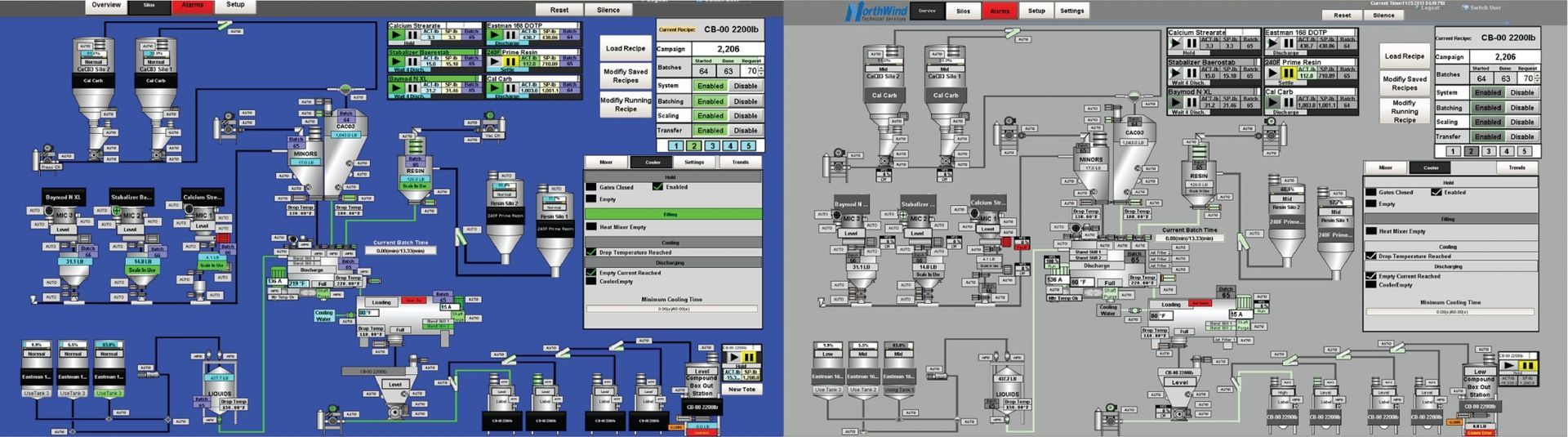
HP graphics reduce troubleshooting time by highlighting pertinent information. While maintaining a visual representation of the equipment and system, HMIs provide a user with helpful alerts and status information. In traditional graphics, the proliferation of color is distracting. HP graphics reserve bold colors and movement only for instances when attention is needed.

Identifying Critical System Data with High-Performance Graphics Before/After


For example, if a receiver refill is disabled and the receiver is below low level, the low-level indication is visible, but the banner will be gray instead of yellow. This color change allows the operator to better focus on critical information.


How to Transition an HMI to HP Graphics


It’s possible that some personnel will not be initially accepting of the new graphics. The biggest push back when upgrading to HP graphics generally comes from operators that have been working with traditional HMIs for a long time and are used to a lot of color and detail on the screen. The grayscale color scheme brings a misconception that the new HP graphics will make it harder to understand what is happening in the system. However, with more muted tones, alerts and warnings are very easy to spot, providing the user a very readable HMI.


HMI alerts and alarms that benefit from HP graphics include:


  • System Status
  • Device Faults
  • Low Feed Rate
  • Ingredient Setpoints
  • Trends
  • Process Variables
  • Batch Details


Implementing HP Graphics on the Plant Floor


NorthWind has moved to HP graphics as a standard for all projects. With this change, we have maintained the same overall feel, while providing a more readable HMI. Our HOA banners, menu bar, and feed point objects maintain similar aspects to our old graphics package but are now more visible when data is most critical.

A lot of the changes incorporate the intentional use of color and adding dynamic visibility – displaying exactly what information the user needs to see at the critical moment. To further ease troubleshooting, reference points are built into the HMI, PLC, and electrical drawings, allowing personnel to quickly find the information they need.

NorthWind trains and supports customers through the transition to HP graphics – from the startup process to complete integration. We also transition existing HMIs to HP graphics for a streamlined user experience across the entire manufacturing plant.


At NorthWind, we’re all about data. The efficiencies gained with the new graphics are everything we’re about – accurate process data in the most usable form.

Sydney Bosworth

Written by


Sydney Bosworth

Standards Programmer, Level II

Advanced Batching Control System Modernizes Animal Feed Production
By Eduardo Martinez June 16, 2026
An Animal Feed Producer in Costa Rica faced a critical challenge with their outdated standalone batching system in the main production area of their plant. The issues they were experiencing with...
AI for Manufacturers Guide
By NorthWind Technical Services April 21, 2026
The AI Guide for Manufacturers: Improve Uptime, Throughput, and Quality
Quality Assurance Station
By NorthWind Technical Services April 15, 2026
Developed in collaboration with Wenger Manufacturing and Extru-Tech, recognized leaders in extrusion technology, our Quality Assurance Station (QAS) represents a significant leap forward in how...
Show More